How to Register at TCL99 Australia: Sign-Up and Verification
Filling in the TCL99 sign-up form takes a little under two minutes. The verification that has to follow it takes the better part of two days. That gap between two minutes and two days is the most useful thing to understand before you start, because registration at TCL99 is trivial while getting an account that can actually pay you out is a separate job entirely, handled by a compliance desk that never sees the sign-up form. Most players only discover the difference when they try to withdraw, which is the worst possible moment to find out.
What follows is the whole sequence in the order it happens: what to have in front of you before you open the form, which field rejects people most often, what the confirmation email looks like and when it does not arrive, which documents clear verification first time and which come back rejected, how the first deposit attaches the offer, and what the operator does with a second account opened under the same name. If you have not decided on the brand yet, read our TCL99 casino verdict first, because this page assumes you already have.
Before you touch the form: what to have ready
Five minutes of preparation here saves a fortnight of emails with support later. Three things matter, and what they have in common is consistency rather than paperwork.
Your legal name, exactly as it appears on your ID
Not the name you use online, not a shortened version, not a middle name dropped because the field looked cramped. If your driver licence says Matthew and you type Matt, the account details and the document will not match at verification, and the operator’s compliance team is not obliged to assume they are the same person. Fixing a name after registration means a support ticket, a document upload and a wait, when typing it correctly the first time would have cost you nothing. The same applies to hyphenated surnames and to apostrophes: put them in.
The documents you will need later
Nothing is uploaded during registration itself. The uploads come before your first withdrawal instead, and there is no way around them. Have a clear photo of your photo ID, something that proves your residential address dated within the last three months, and a screenshot or photo showing that your payment method belongs to you. Details on what is accepted are in the table further down. Collect them now, while you are calm, rather than on the day you are trying to cash out a win.
A payment method in your own name
Third-party funding is refused at offshore casinos as a rule, and TCL99 is no exception. Your partner’s card, a friend’s PayID, a shared family account — all of these create a mismatch between the account holder and the payer, and that mismatch is the most common reason a withdrawal sits in review for a week. The minimum deposit is A$20, so the size of the payment is rarely what trips people up. Ownership of the method is what gets checked. If you want to compare the options before you commit, you can fund your account after signing up using whichever method actually sits in your name.
Registering at TCL99 step by step
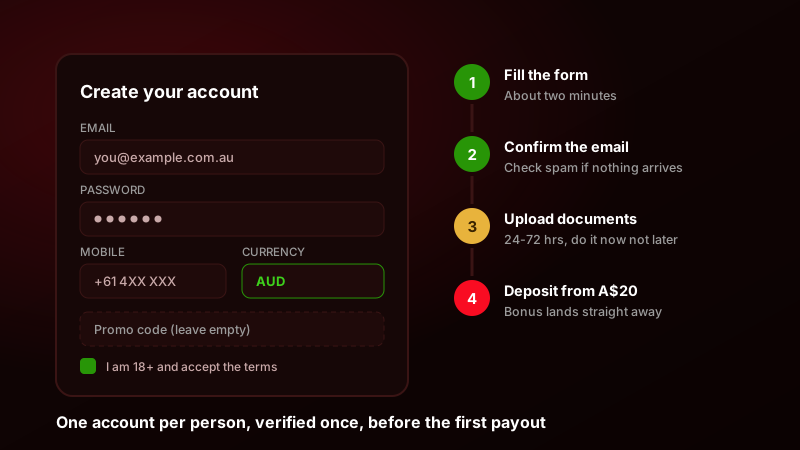
Here is the sequence as it runs, with the timings the process realistically takes rather than the timings a landing page would quote at you.
- 1Open the sign-up form
Tap the green Sign Up button in the top-right of the header on desktop, or open the account menu and choose Register on mobile. The form opens as an overlay on the page you were already on, so you do not lose your place.
- 2Fill in your details
Email, password, mobile number, first and last name, date of birth, and currency. Set the currency to AUD here and check it twice, because it is fixed for the life of the account and cannot be swapped later.
- 3Confirm your email
A confirmation message lands within about five minutes. Click the link inside it. Until you do, the account exists but the cashier stays locked and no deposit will go through.
- 4Verify your identity
Open the account section, find Verification, and upload your photo ID, proof of address and proof of payment method. Do this the day you register rather than the day you want your money, because this is the only slow stage in the whole process.
- 5Make the first deposit
Open the cashier, choose your method, deposit at least A$20, and confirm whether the welcome offer is switched on before you press submit rather than after.
The form, field by field
There are eight fields on the desktop version and the same eight stacked on mobile. Email is used as your login, so use an address you will still control in two years, not a work address you lose when you change jobs. The mobile number field already carries the +61 country code in a small dropdown to the left of the box; type your number without the leading zero, so 4XX XXX XXX and not 04XX XXX XXX. Date of birth is three separate selectors on desktop and a native date picker on mobile, and the site rejects anyone under 18 outright, with no waiting list and no soft warning.
The currency selector is the field people regret. It defaults sensibly for Australian traffic, but if you arrive through a link that carried a different market’s parameters, it can land on something else. AUD means your balance, your deposits and your withdrawals all stay in dollars you understand and there is no conversion spread taken off the top. Changing it afterwards is not a settings toggle; it means closing the account and opening a new one, which brings you straight into the duplicate-account problem described at the bottom of this page.
Passwords and the strength meter
The password field wants at least eight characters with a mix of upper case, lower case and at least one digit. The meter is stricter than the text underneath it suggests, and it will refuse a passphrase that looks perfectly strong to a human if it contains no digit at all. Two practical notes that catch people out on this field: a password pasted from a manager sometimes brings a trailing space with it and the form reads that space as part of the password, so the field validates but the first login fails; and the site does not offer two-factor authentication at registration, so the password is the whole of your account security. Make it unique to this site. When you are done here you can log in to your new account and confirm the password works before you put any money behind it.
The promo code field
There is a promo code box on the sign-up form. Leave it empty. TCL99 does not publish working public codes, and the welcome package credits on a qualifying first deposit without anything typed into that field. Code lists that claim otherwise are recycled from other brands, and a rejected code at sign-up occasionally blocks the offer from attaching at all. The detail of what you are actually getting is on the welcome bonus for new players page, where the wagering arithmetic is worked through properly.
Confirming your email and phone number
Email confirmation is mandatory and it gates the cashier. The message arrives from a no-reply address carrying the brand name, subject line along the lines of “Confirm your email address”, with a single button inside it. Delivery is usually under a minute to a Gmail address and a few minutes longer to Outlook or Hotmail, because offshore casino mail sits low in most providers’ reputation scoring and gets held for extra filtering. The link stays valid for 24 hours; after that you request a new one from the account area rather than re-registering.
When the confirmation email does not arrive
In order: check the spam and promotions folders, because offshore casino mail is filtered aggressively by most Australian providers. Then check the address itself for a typo — the form does not ask you to type it twice, and a single wrong character produces an account nobody can confirm. If the address is right and the folders are empty after ten minutes, request a resend from the account panel. If a second message also fails to arrive, the address is almost certainly blocklisted at the provider end and you will need a different one, which means support has to detach the old address rather than you opening a second account.
The SMS step
Phone confirmation is a six-digit code sent by SMS, and it is triggered either during registration or at the first withdrawal request depending on how the account was created. It is worth completing early for the same reason as everything else on this page. Australian mobiles receive it in seconds; if you are using a number that redirects through a VoIP service, expect it either to arrive garbled or not at all, and expect the operator to treat a non-mobile number as a flag.
KYC: which documents TCL99 accepts
Verification is where accounts stall. The table below sets out what each document has to show, what the rejection notices most often say when it does not, and how long each check runs, so you can avoid the round trip.
| Document | What is accepted | Common rejection reason | Typical turnaround |
|---|---|---|---|
| Photo ID | Australian driver licence (both sides), passport photo page, or a Keypass proof-of-age card. Colour, all four corners visible, unexpired. | Only one side of the licence uploaded, or the card number obscured by glare from a ceiling light. | 24-48 hours |
| Proof of address | Utility bill, council rates notice, or a bank statement dated within the last three months, showing your name and residential address on the same page. | A statement PDF exported without the header, so the address block is missing. Mobile phone bills are inconsistently accepted. | 24-48 hours |
| Proof of payment method | For cards, a photo of the card with only the first six and last four digits visible and the CVV covered. For PayID or bank transfer, a screenshot of your banking app showing your name against the account. | The full card number left visible, which gets the upload refused on security grounds rather than identity grounds. | 24-72 hours |
| Selfie with ID | A photo of you holding the same ID document you uploaded, face and document both readable in one frame. Requested case by case, not from everyone. | Taken in a mirror, so the document text reads backwards, or the face cropped at the forehead. | 24-48 hours |
| Source of funds | Payslips, a tax assessment notice, or bank statements showing regular income. Requested at larger cashouts or after an unusual deposit pattern, not on a standard A$20 account. | A single screenshot of a balance with no name or institution attached, which proves nothing about where the money came from. | 48-72 hours, longer if the file is queried |
| Crypto wallet ownership | A screenshot from your exchange or wallet showing the receiving address you submitted, taken from inside your logged-in account. | An address pasted as plain text with no context, or an address that differs by a character from the one on the withdrawal request. | 24-48 hours |
How to photograph a document so it clears first time
Daylight near a window, document flat on a dark surface, phone parallel to the document rather than tilted, flash off. Flash is what throws the glare that swallows card digits and the hologram on a licence, and a glare-spoiled photo is one of the most common reasons an otherwise valid upload is bounced. Do not crop, do not straighten, do not run it through a filter that raises contrast — enhanced images are routinely rejected as edited. Upload the original file rather than a copy sent to yourself through a messaging app, because most messengers compress images to the point where small print stops being legible. Files are usually capped around 5 MB, which a normal phone photo sits comfortably under.
Verify on the day you register, not the day you cash out
This is the part that decides whether your experience of TCL99 is a good one. Everything except verification is over in minutes. Verification runs in days instead, and it runs whether you planned for it or not, because the operator will not release a first payout to an unverified account.
Verification is the only slow stage — start it the day you register, not the day you want to cash out.
Run the numbers on what that means in practice. Register on Saturday, play, win, request a withdrawal on Sunday and only then start uploading documents, and your money moves at the end of the following week. The payment rail is not what slowed it down; you queued the compliance step behind the payout instead of in front of it. Upload the same documents on Saturday while you are waiting for your deposit to land, and the withdrawal you request a week later is processed against an already-verified account. Nothing changes about the documents or the people reviewing them. The only variable you control is when you join the queue.
A word on where these numbers come from, because it matters more on this page than anywhere else on the site: the verification timeframes quoted for TCL99 do not agree between sources. Some listings say 24 hours, others say up to 72, and the operator’s own help pages have carried different figures at different times. The ranges in the table are the most consistent version across independent sources, not a commitment anybody has made to you. The version that binds you is whatever is sitting in the terms and conditions on the day you deposit, so open them and read the verification clause before you fund anything.
Open your TCL99 account and start verification todayYour first deposit and switching the bonus on
Once the email is confirmed, the cashier unlocks. The minimum qualifying deposit is A$20, and the welcome package (a 100% match up to A$500 plus 100 free spins) attaches to a qualifying first deposit automatically. There is no code, as covered above, but there is usually a toggle or checkbox on the deposit screen controlling whether the offer applies. Check its state before you press submit. A deposit made with the toggle off cannot generally be retro-fitted with a bonus afterwards, and support will tell you so.
PayID is the fastest local route and the one worth defaulting to; the balance normally updates while you are still looking at the confirmation screen in the banking app. Cards fund an account but are declined more often than people expect, because Australian issuers block gambling merchant codes at their end rather than the casino’s. Whichever you choose, the name on the method must match the name on the account, which is the same point as the top of this page for the third and last time.
If you would rather not take the bonus
Turning it down is a legitimate choice and it is easier before the deposit than after. Bonus funds carry 35× wagering on the bonus amount, usually with a 14-day window, and until that requirement is cleared the operator can and does refuse withdrawal requests that would break the bonus terms. If you intend to deposit, play a little and cash out quickly, decline the offer and keep your balance unencumbered. If you intend to grind pokies for a fortnight anyway, take it. What causes trouble is accepting it without having decided anything, and that is where most bonus complaints start.
Sign-up errors, what causes them and how to clear them
These are the messages the form throws, in roughly the order of how often Australian players report running into them.
| Sign-up error | Why it happens | Fix |
|---|---|---|
| “This email address is already registered” | You started a registration previously and abandoned it before confirming, or someone typed your address by mistake. The account exists even though you never used it. | Use the password reset flow instead of registering again. If the reset says no account exists, contact support and ask them to release the address — do not create a second one on a different email. |
| “Please enter a valid mobile number” | The +61 prefix is already set in the dropdown and you typed the leading zero as well, producing +61 04XX. Spaces and dashes also trip the validator. | Enter nine digits with no leading zero and no spacing: 4XX XXX XXX becomes 4XXXXXXXX in the field. |
| “Registration is not available in your country” | A VPN or a privacy DNS is presenting an IP from a market the operator does not accept, which contradicts the country you selected in the form. | Turn the VPN off and reload the page before submitting. Registering behind a VPN and then playing without one creates a location mismatch that surfaces again at verification. |
| “Password does not meet the requirements” | Fewer than eight characters, no digit, or a trailing space carried in from a password manager. The meter also rejects the email address reused as a password. | Type the password manually once to rule out the trailing space, include at least one number, and make it unique to this site. |
| “Invalid date of birth” or an under-18 rejection when you are not | Day and month entered the wrong way round on a browser set to a US locale, so 03/09 is read as 9 March instead of 3 September. | Check the field order on screen before typing. Australian format is day first; if the picker shows month first, adjust accordingly. |
| “Something went wrong, please try again later” | An ad blocker, script blocker or aggressive tracking-protection setting is preventing the form’s validation script from loading, so the submission never reaches the server. | Disable the blocker for this domain, or open the form in a private window with extensions off. If it submits there, the extension was the cause. |
| The form submits but nothing arrives and you cannot log in | A typo in the email address. The account was created against an address that does not exist, so the confirmation bounced into nowhere. | Re-check the address you typed. Support can move the account to the correct address; opening a fresh one leaves you with two accounts under one name. |
| Currency shows something other than AUD and will not change | Currency is set once, at registration, and locked afterwards. A tracking parameter from a non-Australian link can preselect it. | Catch it before submitting the form. If it is already locked, contact support before depositing rather than after, because a funded account in the wrong currency is far harder to unwind. |
| “Your account is pending review” straight after sign-up | An automated risk check has flagged something — usually a device or IP already linked to another account, or details that partially match an existing profile. | Respond to the support request with your documents promptly. Opening a second account while the first is under review converts a delay into a closure. |
If your problem is not on that list, the common sign-up questions page covers the smaller edge cases, including what to do when the site loads but the sign-up overlay does not open at all.
One account per person, and what a second one costs you
The rule is one account per person, per household, per device, per payment method. That clause is no decoration. Offshore operators enforce it more consistently than almost anything else in the terms, because duplicate accounts are how bonus abuse works, and catching bonus abuse is what their risk systems were built for.
What actually gets flagged as a duplicate
More than you would guess. Two profiles carrying the same name and date of birth is the obvious case. Harder to see coming are the same payment method used on two accounts, the same device fingerprint, the same home IP address, or the same residential address on two sets of proof-of-address documents. Two people in one household who both want to play will trip the household clause even when both are genuine, and the only clean way through that is to declare it to support up front rather than let the system find it.
What happens to the balance
The standard outcome is that the newer account is closed, any bonus funds and winnings derived from bonus funds on it are removed, and deposits are returned to the original payment method. In practice, “returned” can mean a manual review that takes longer than any normal withdrawal, and the older account is often frozen alongside it while the two profiles are compared. There is no version of this that ends with you better off. If you have locked yourself out of your first account, recover it rather than starting again: reset the password, contact support, and prove who you are. If you prefer to do the whole thing on your phone, you can sign up through the TCL99 app experience on mobile, but it is the same account and the same one-per-person rule, not a second slot.
18+, deposit limits and knowing where the exit is
You must be 18 or over to open an account, and the operator will ask you to prove it before it pays you anything. That is only the floor. Set a deposit limit in the account settings on the day you register, while you are still thinking clearly about numbers rather than reacting to a session. A limit set in advance is the most effective control available to you, and it works precisely because it takes effect before the moment you would want to override it.
Australian players who want a harder stop have BetStop, the national self-exclusion register, which blocks licensed operators from accepting you and is free to join. Gambling Help Online is available on 1800 858 858, around the clock, and talking to them costs nothing. Play with money you have already decided you can lose, treat the balance as entertainment spend rather than an investment, and close the tab when the session stops being fun.
Register once, verify on day one, deposit second
Two minutes on the form, then upload your ID before you fund the account. Doing it in that order is what turns a first withdrawal that waits three days into one that clears in an hour. Minimum deposit A$20, welcome package 100% up to A$500 plus 100 free spins — check the current terms in your own account before you deposit.
Create your TCL99 account