TCL99 App: Mobile Access on Android and iPhone
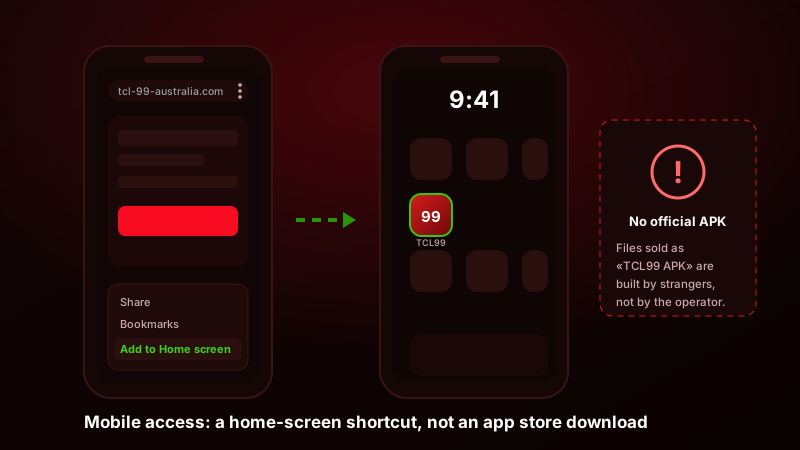
We went looking for the TCL99 app the way any Australian player would. A search of Google Play, then a search of the Apple App Store, then the operator’s own site read end to end for anything resembling a download link, and finally the file-sharing pages that rank for the phrase TCL99 APK download. The result was the same every time: there is no TCL99 application. Not a hidden one, not a regional one, not one you unlock after registering. What exists is a mobile website that works properly on a phone, and a browser feature that lets you pin it to your home screen so it opens like an app. Everything else being handed around as a TCL99 install file was put there by somebody who is not the casino.
That gap matters because the search results tell a different story. Several pages ranking for TCL99 mobile queries in 2026 walk you through enabling unknown sources and installing an .apk, complete with fake version numbers and file sizes. Those instructions describe software that does not exist. This page covers what works instead: pinning the site on Android and on iPhone, what runs well in a mobile browser and what does not, how deposits and cashouts behave on a phone, and exactly what people are distributing under the TCL99 name.
Is there an official TCL99 app for Android or iPhone?
No. There is no TCL99 listing in Google Play, none in the Apple App Store, and no signed installer offered from the operator’s own domain. The mobile experience is the website, rendered in whatever browser you already use, and the operator does not pretend otherwise: the site has no download banner, no “get the app” interstitial and no QR code pointing at a package file. Everything we describe below is a way of making that website more convenient to reach, not a way of installing software.
What we checked, and how
Three passes. First, store search on both platforms for TCL99, TCL 99, TCL99 Casino and TCL99 Australia, including region-switched searches in case a listing is geo-gated away from Australia. Nothing came back beyond unrelated apps from the electronics manufacturer with a similar name. Second, the operator’s mobile site, examined for any download link, app manifest pointing at an installer, or app-store smart banner in the page head. There is none. Third, the third-party pages that rank for TCL99 app queries, which is where the interesting part starts and where the section below picks it up.
One honest note before you read further: the details published about TCL99 differ from source to source, and the app question is the clearest example. Sites still describe screens, menu positions and installation flows for an application nobody can produce. Treat anything you read about this brand, here included, as something to confirm on the live site and in your own account before it costs you money. If you want the full picture of what the operator is and is not, our TCL99 Australia review lays out the licensing position in plain terms.
Why an offshore casino usually has no store listing
This is not a TCL99 quirk. Google Play permits real-money gambling apps only in a short list of approved countries, and only from developers who complete a per-country application backed by a local licence. Apple applies the same logic and asks for licence documentation tied to each territory before a gambling app is allowed to publish. An operator running on an offshore licence for the Australian market cannot satisfy either requirement, so it does not apply. Building a native app that no store will distribute means paying for development and then having no legitimate way to deliver it, which is why most casinos in this segment do exactly what TCL99 does and invest in the mobile web build instead.
The practical upshot is good news for you. A browser-based casino updates the moment the operator pushes a change, cannot fall out of date on your device, does not sit in your storage, and never asks for a single Android permission. There is no version to keep current and no build that stops working after an OS update.
Why third-party TCL99 APK files are dangerous
Search for a TCL99 download and you will find files. Mirrors, aggregator sites, Telegram channels, forum attachments, YouTube descriptions. They are listed at between 8 MB and 60 MB, they carry a TCL99 icon, and the pages hosting them promise an install that opens straight into a casino lobby, which is precisely what makes them convincing. None of them came from the operator, because the operator does not build one. So somebody else built it, and the only question worth asking is what they wanted in return.
What is actually inside those files
In the mildest case, a wrapper. A WebView shell, which is a browser window with the address bar removed, pointed at the casino URL with somebody’s affiliate tracking baked into it. It works, it looks like an app, and its only purpose is to redirect your account to the person who built it. Harmless to your device, useless to you, and there is no reason to run one when your own browser does the same job with a visible address bar.
The rest of the spectrum is where the damage lives:
- Credential stealers. The wrapper injects JavaScript into the page it loads, so every keystroke in the login form goes to the operator and to a third-party server. Your casino password, and the same password if you reuse it elsewhere.
- Banking overlays. The best-known family of Android malware in this category, and the reason gambling APKs are a favourite delivery route. Once installed, the app watches which application is in the foreground and draws a pixel-accurate fake login screen over your banking app the moment you open it. You type your details into the overlay, not the bank. Ask for accessibility permissions and the same technique reads one-time SMS codes straight off the screen.
- Premium SMS and subscription fraud. Quiet, cheap to run and often invisible for a full billing cycle. The app requests SMS permission during install, sends messages to premium shortcodes in the background, and deletes the confirmations before you see them. You find out when the bill arrives.
- Adware and click fraud. Full-screen ads appearing over other applications, plus background requests that burn your data allowance and your battery for somebody else’s ad revenue.
- Payment-page interception. The most expensive version for a casino player. The wrapper rewrites the cashier page, so the PayID address or wallet you copy is not the one the casino generated. The money leaves your bank correctly, and it never arrives in your balance.
Why the signature is wrong and Play Protect objects
Every Android package is cryptographically signed by whoever built it. The signature is what ties an app to a developer, and it is why Android refuses to update an app with a package built by anyone else. A genuine casino app carries the operator’s signing key. A file assembled by a mirror site carries a self-signed certificate created by whoever repackaged it, frequently a default debug key that took no effort to generate. There is nothing to verify against, because the operator has never published a key for anyone to compare with.
That is what Google Play Protect is reacting to when it warns you. It scans installs from outside the store, and an unsigned or unrecognised gambling package with SMS, accessibility or overlay permissions hits several rules at once. Every set of APK instructions we found solves this the same way: turn off Play Protect, allow installs from unknown sources, dismiss the warning. You are being asked to disable the exact check that exists to catch this file. When the instructions require you to switch off the alarm, the alarm is working.
Two more tells are easy to check. A legitimate mobile casino build asks for effectively nothing beyond network access; if an installer wants SMS, contacts, accessibility services or the ability to draw over other apps, it is not there for the pokies. And if you have already installed one of these files, remove it, run a Play Protect scan, change your casino password and your banking password from a different device, and watch your statements for small unexplained charges, because subscription fraud starts low on purpose.
Install the TCL99 shortcut on Android, step by step
Here is the honest alternative, and it takes about fifteen seconds. Chrome on Android can save a website to your home screen as an icon that opens without browser chrome: no address bar, no tabs, straight into the lobby. It looks like an app on the home screen and behaves like one when you switch between tasks. It installs nothing, requests no permissions, cannot access your other applications, and can be removed by dragging the icon to the bin.
- 1Open the site in Chrome on Android
Type the TCL99 address into Chrome yourself rather than following a link from a forum or a search ad, and wait for the lobby to finish loading. Confirm the padlock is showing before you go any further. If you already have an account, sign in first so the shortcut opens on a logged-in session.
- 2Tap the three-dot menu
The menu button sits at the top-right of Chrome, next to the address bar. On some Android skins with a bottom toolbar it is at the bottom-right instead. Tap it to open the page menu.
- 3Choose Add to Home screen
On current Chrome builds the entry reads Add to Home screen, on some versions Install app, and on Samsung Internet it lives under Add page to, then Home screen. Any of the three does the same thing. If you cannot see it, scroll the menu — it sits below the sharing options.
- 4Confirm the name and icon
Chrome suggests a name from the page title. Shorten it to something neutral if the phone is shared, then tap Add. The icon appears on your home screen and opens the site full-screen from then on, with no browser bar across the top.
Two things to expect from it. The shortcut is a bookmark with a nice icon, so it inherits your Chrome session. If you were signed in when you created it, you stay signed in until the session expires, and when it does you simply sign in on your phone the same way you would in the browser. And it never goes stale: because it points at the live site, you are always on the current build without updating anything.
Firefox and Samsung Internet both offer the same feature under slightly different wording. Firefox uses Install or Add to Home screen in the page menu; Samsung Internet puts it under Add page to. Brave and Edge behave like Chrome, since they share the underlying engine.
Open TCL99 in your mobile browser and check the current offerAdding TCL99 to your iPhone home screen
iOS has no equivalent of sideloading, so on an iPhone the question of installer files does not arise. Anything advertised as a TCL99 iOS app is either a different product with a similar name or a profile you should not install. What you can do is the same home-screen trick, and on iOS it must be done in Safari. Chrome and Firefox on iPhone can add a bookmark, but only Safari creates the full-screen web-app icon.
Open Safari and load the site. Tap the Share button, the square with an upward arrow, which sits in the bottom toolbar on an iPhone and at the top-right on an iPad. Scroll the share sheet until you reach Add to Home Screen; it is well down the list, below Add Bookmark and Add to Favourites. Tap it, edit the name if you want something less obvious on a shared phone, and tap Add. The icon lands on the last home-screen page and opens the site full-screen, with no Safari toolbar and no address bar.
Three iOS quirks to expect. Safari on iPhone treats each home-screen web app as a partly separate browsing context, so you may be asked to log in the first time you open the icon even though you were signed in in Safari itself; after that it holds the session normally. Second, iOS clears website data for web apps that go unused for a long stretch, which can log you out after weeks of not opening it; the fix is to sign in again, nothing more. Third, if you use Screen Time restrictions or a content filter, gambling sites are frequently blocked at the network or profile level and the icon will simply refuse to load; that is the filter doing its job, not a fault with the shortcut.
What actually works on mobile, and what does not
What matters more than how you open the site is what runs once it is open. The short answer is that almost nothing is missing. Registering, depositing, spinning, sitting at a live table, betting on the AFL and cashing out all sit inside one responsive build rather than a cut-down mobile version with features stripped out, so the phone gets the same casino the desktop does rather than a limited edition of it.
Everything except notifications runs in the mobile browser; a home-screen shortcut only changes how you open it.
Pokies are the strongest part. The 1,300-plus library from Pragmatic Play, NetEnt, Microgaming, Booongo, JILI and Gamzix is built in HTML5, so titles load in portrait or landscape, autoplay and bet adjustment sit where your thumb is, and the in-game info panel with the RTP figure is the same one you get on desktop. Demo mode works on a phone too, which makes it the cheapest way to play pokies on mobile before committing a deposit. Crash titles like Aviator are arguably better on a phone than a monitor, since the cash-out button is under your thumb.
Live dealer is the one area with a caveat, and it is bandwidth, not code. Blackjack, roulette, baccarat and the game shows all stream to a phone, but they are pulling continuous video, and on a patchy 4G connection the stream degrades or drops mid-hand while your bet stands. Play live dealer games on mobile on Wi-Fi or a solid 5G signal, not on a train. The sportsbook is complete: AFL, NRL, cricket including the BBL, tennis, rugby and eSports, all with the same markets as desktop, subject to the Australian rule that online in-play betting is restricted under the Interactive Gambling Act 2001, which applies to the operator regardless of the device you are holding.
| Access method | How you get it | What works | Risk level |
|---|---|---|---|
| Mobile browser (Chrome, Safari, Firefox, Samsung Internet) | Type the address into the browser you already use | Everything: pokies, live tables, sportsbook, cashier, KYC uploads, support chat | Low — nothing is installed and you can see the address bar |
| Home-screen shortcut, Android | Chrome menu, then Add to Home screen | Identical to the browser, opening full-screen without the browser bar | Low — a bookmark with an icon, no permissions requested |
| Home-screen shortcut, iPhone | Safari share sheet, then Add to Home Screen | Identical to Safari, full-screen; may ask you to sign in again the first time | Low — no installer, no profile, removable in one tap |
| Third-party APK from a mirror or file site | Not offered by the operator; distributed by unknown third parties | Usually a browser wrapper; may carry stealers, banking overlays or SMS fraud | High — unsigned package, requires disabling Play Protect. Do not install |
| Official app store listing | Does not exist — nothing in Google Play or the App Store | Nothing; any listing under this name is a different product | Not applicable — there is no legitimate store download to find |
Data usage, battery and device requirements
The hardware bar is low. Anything running Android 8 or later, or iOS 14 or later, will load the lobby, which covers essentially every phone still receiving security updates. Two gigabytes of RAM is enough for pokies; four makes the live tables smoother. There is no storage requirement beyond the browser cache, because nothing is installed; the shortcut itself occupies a few kilobytes.
Data is the number worth planning around, and it varies enormously by section. Browsing the lobby and spinning pokies is light: HTML5 titles of this kind run in the region of 15 to 40 MB an hour, most of that the initial game load, with each spin costing almost nothing afterwards. The sportsbook is lighter still, in the region of 10 to 20 MB an hour unless you leave a live scoreboard running. Live dealer is a different category entirely, because it is HD video: budget 250 MB to 1 GB an hour depending on stream quality. An evening at a live blackjack table on mobile data is a noticeable dent in a modest plan.
Battery follows the same shape. Pokies in a browser drain roughly what video streaming does; live tables drain faster because the screen stays at full brightness while decoding video continuously. If you play live on a phone, expect to be plugged in. One practical note worth acting on before you sit down: turn off battery saver ahead of a live session. Aggressive power management on some Android skins throttles background network activity and will drop the stream while you have money on the table.
Deposits, withdrawals and KYC from your phone
The cashier is fully functional on mobile, and in the Australian case it is genuinely better there than on a desktop, because the fastest deposit method lives on your phone anyway. PayID and Osko mean copying an address from the cashier, switching to your banking app, sending A$20 or more, and switching back to a balance that has already updated. The whole thing takes under a minute without leaving the device. Card deposits work when the issuer approves them and are declined often enough that we would not rely on one; Neosurf and crypto both behave the same on mobile as on desktop.
Cashing out is where phones have a real advantage, because the slow part of any withdrawal is document verification and your phone is a camera. You can upload the whole KYC set (photo ID, a selfie, a recent utility bill or bank statement for address) straight from the camera roll, which removes the usual detour of photographing documents and emailing them to yourself. Get that done before your first withdrawal request rather than after and you withdraw straight from your phone without the compliance queue adding days to it. Approved PayID and Osko payouts land within about an hour, crypto in ten to sixty minutes, and bank transfers take one to three business days.
Registration is equally complete on a small screen. There is no desktop-only step, so you can register through the app shortcut in the same session in which you install it, and the promo-code field on the sign-up form is present on mobile exactly as it is on desktop. Verify your email and phone at the time of signup rather than putting it off. The account works either way, but the first withdrawal will not clear until both are done.
Notifications, offline access and what a shortcut cannot do
Two things a home-screen shortcut will not give you, and both deserve a straight answer.
The first is push notifications. There are none. A native app could ping you about a reload offer or a settled bet; a web shortcut for this site does not, on either platform. Whether that is a loss depends on your temperament. A casino that cannot interrupt your evening with a promotional buzz is arguably the safer arrangement, and if you want to know about the weekly 10% cashback or a weekend reload you check the promotions tab yourself. Anything claiming to add TCL99 notifications to your phone is asking to install something, which puts you back in the previous section.
The second is offline access. Real-money games run on the operator’s servers, so there is nothing to cache and no offline mode. Lose signal mid-spin and the outcome is already determined server-side, so the result is applied to your balance and you will see it when you reconnect. Lose signal at a live table and the hand plays out according to the table rules for a disconnected seat, which is exactly why we would not sit at a live table on a marginal connection.
What you also do not get, and should not want, is anything sitting in your app drawer with permissions. No storage footprint, no update cycle, no access to your contacts, your messages or your other apps. The shortcut is a bookmark. That is its whole security model, and it is the reason it is the right answer here.
Add TCL99 to your home screen and play from your phoneThe verdict on TCL99 mobile in 2026
If the reason you came here was to find the TCL99 app, the useful answer is that you have already got it. The mobile site is the product: complete, current, and reachable in one tap once you pin it. The pages telling you to enable unknown sources and install a package file are describing software that the operator has never built, and the files behind those instructions were made by people whose interests run from harvesting your affiliate signup to overlaying your banking app. The one-line version: no store listing, no official installer, use the browser, pin the shortcut, install nothing.
What mobile does well
- The full 1,300-plus pokie library runs in the browser, including demo mode
- Nothing is installed, so no permissions, no storage use and no update cycle
- Home-screen shortcut opens full-screen and looks and feels like an app
- PayID deposits are faster on a phone because the banking app is already there
- KYC documents upload straight from the camera roll, which is the slow part of any first withdrawal
- Always the current build — a web shortcut cannot fall out of date
- Works on any phone still getting security updates: Android 8 or newer, iOS 14 or newer
Where it falls short
- No push notifications on either platform, so promotions and settled bets are yours to check
- No offline mode at all, since every game runs server-side
- Live dealer needs a stable connection and burns 250 MB to 1 GB an hour
- Live tables drain the battery fast enough that you will want a charger
- iOS may ask you to sign in again the first time you open the icon, and after long periods unused
- No official store listing means no store-level vetting or refund path
- Search results are full of install guides for an app that does not exist
Skip the APK and pin the site instead
Open TCL99 in Chrome or Safari, add it to your home screen, and you have the whole casino in one tap with nothing installed. Deposit from A$20 with PayID, and verify your identity before your first cashout rather than after.
Open TCL99 on your phone